iPhone · iPad · iOS 18.4+
Simple Car Compass
Your speed, your direction of travel, and the name of the street you're on — sized to be read with a glance from the driver's seat, and nothing else on the screen.
Request a beta invite Privacy policy
Private beta on TestFlight — invites by request. Needs iOS 18.4 or later.
What's on the screen
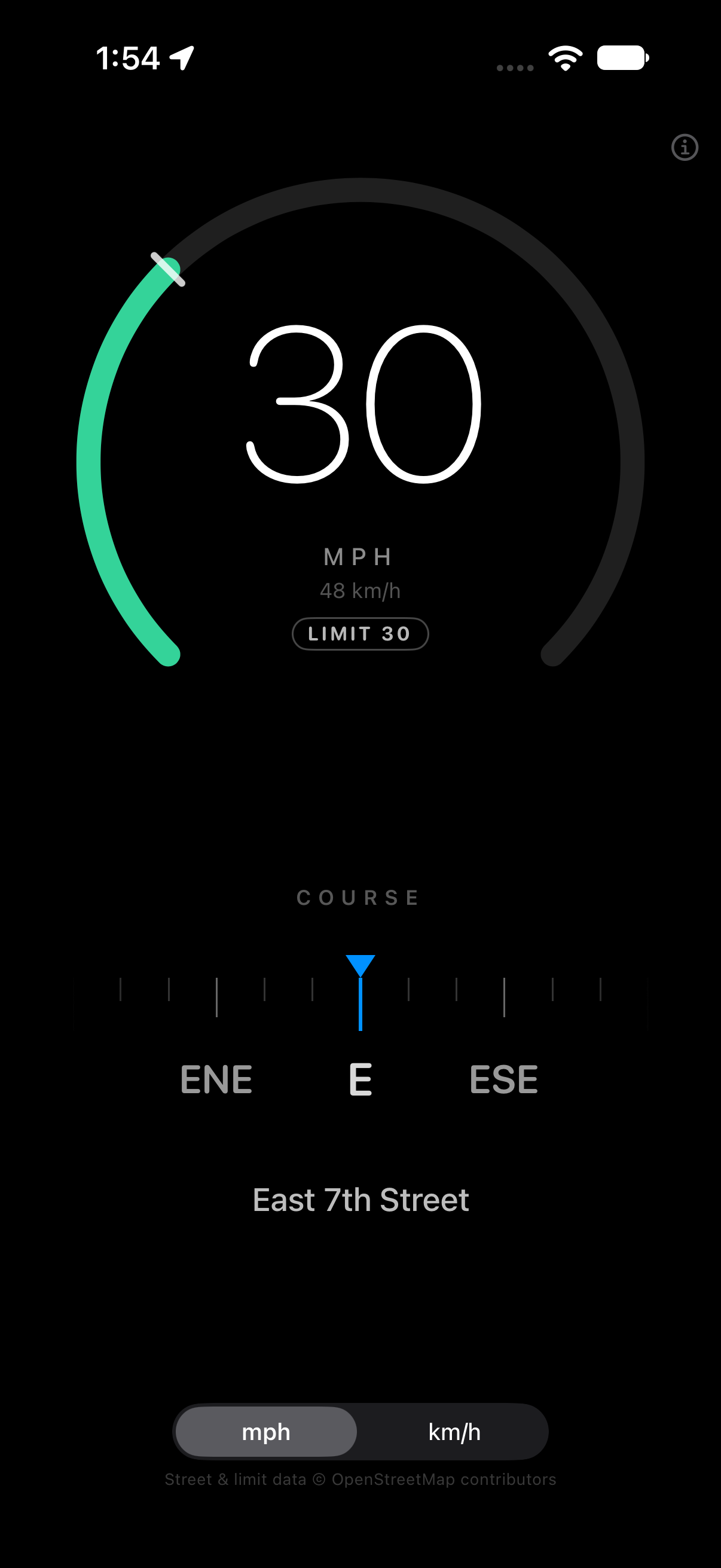
One dashboard, split between a speed gauge and a direction panel. Upright they stack; turned sideways in a mount they sit side by side. Nothing moves unless the car does.
- Speed
- The current speed as a whole number, in mph or km/h — the picker remembers your choice between launches, and the other unit sits underneath in smaller type.
- The arc
-
A ring that fills with your speed, coloured against the road's posted
limit, with a tick where the limit falls and a
LIMIT 30badge repeating the number. - Direction
- A fixed-marker heading tape: 90° of compass slide past a centre marker, labelled every 22.5°. The distance a mark travels is the size of the turn. It is damped, so the ribbon glides instead of jumping between readings.
- Street
- The name of the road you're on, when the app can get one.
What the colours mean
| Band | Meaning |
|---|---|
| Green | At or under the posted limit |
| Amber | Over the limit by up to 5 mph |
| Red | More than 5 mph over |
On a road with no known limit the arc isn't drawn at all. Green there would claim the app knows the posted speed when it doesn't.
Two sensors, and it says which
While you're moving, direction comes from GPS course over ground and the
label reads COURSE — the direction the car is actually
travelling. Stopped, or with no course available, it switches to the
magnetometer and reads HEADING, so a parked car points where
it faces rather than where it last went. The compass follows the device
orientation, which is what makes it read correctly when the phone is
clamped sideways.
What it needs, and what it won't do
Street names and speed limits come from OpenStreetMap
iOS has no speed-limit API — not MapKit, not Core Location — so the street
name and the posted limit are read from the maxspeed tag on
OpenStreetMap, through its Nominatim reverse geocoder. Road
lookups are off until you turn them on, from the information
button in the corner. With them on, an approximate location (rounded to
about a metre) goes to Nominatim; speed and compass readings never leave
the device. Turning the setting off clears the road data and cancels any
lookup in flight.
Lookups are throttled well inside Nominatim's one-per-second policy: at most one every three seconds, only after moving 50 m, cached for five minutes within a car's length, with a one-minute backoff after a failure. Street and limit data is © OpenStreetMap contributors, under the ODbL.
What it is not
- Not a substitute for your speedometer, and not a satnav. There is no map, no route, no turn-by-turn.
- No offline road data. Without a connection, speed and direction still work; street name and posted limit don't.
- Not every road has a posted limit in OpenStreetMap — most residential streets don't, and the arc stays empty there.
- It keeps the screen awake while it's open, because a dashboard that dims is a dashboard you can't read.
The beta
The first build passed Apple's beta review on 31 October 2026. The beta is small and invitation-only: ask me and I'll add your Apple ID, and TestFlight emails you the build. There's no public link, and no App Store release yet.
Request an invite — the draft asks for the three things I actually need: your Apple ID email, your device and iOS version, and how the phone sits in the car.
Testers are asked to mount the phone and drive: confirm the speed tracks
the speedometer, that the arc changes colour at the sign's number, that
the tape follows a turn without spinning at north, and that the reading
switches from COURSE to HEADING when you stop.
Feedback by email
is the fastest route — it reaches me, not a ticket queue.
Privacy, in one line
No account, no analytics, no advertising, no server of mine. The only thing that ever leaves the phone is the road lookup you switch on, and that goes to OpenStreetMap. Read the full policy.
Get in touch
Beta invites, bug reports, or a feature you actually want while driving: